Running sales from WhatsApp Business feels simple at the beginning. But once the number of chats grows, things get messy fast. Some leads disappear in the inbox, follow-ups don’t happen on time, and customers are left waiting. All of this usually ends with fewer deals closed.
According to Comparapps, the right tools can increase productivity by up to 50%. That’s why choosing the best WhatsApp CRM in 2025 helps you bring order back to daily work. In this post, you’ll find a clear comparison of the top 10 options so you can decide which one really fits your business.

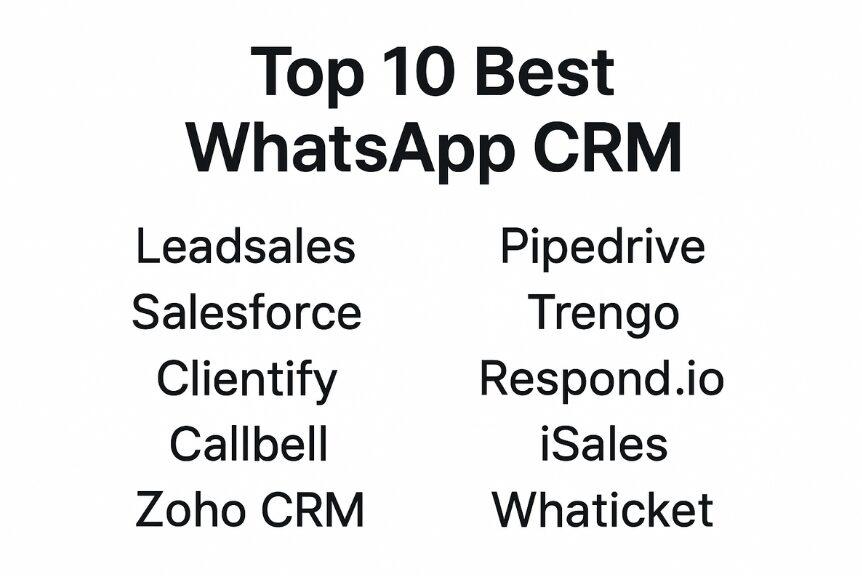
Top 10 vest WhatsApp CRM tools to use in 2025
The search for the best WhatsApp CRM isn’t about picking the most popular name, but the one that fits the way your team works. Some businesses need strong automation, others prefer advanced reporting or multi-agent support.
Here’s our list of 10 platforms worth considering in 2025, with the pros, cons, and pricing of each:
1. Leadsales
Leadsales is a CRM designed for WhatsApp, Instagram, and Messenger, built specifically for small and medium businesses that handle dozens of chats daily. Instead of jumping between phones and spreadsheets, everything is managed from one dashboard. You can hand conversations to the right teammate and follow each client without losing track.
What you can do with Leadsales
- Organize conversations in visual funnels → Create customizable stages like “New lead”, “Contacted”, or “Closed deal”. This gives you a clear view of where every lead or client is in your sales process.
- Work as a team on one WhatsApp number → Multiple users can reply from the same business line, each with their own login, avoiding the chaos of a shared phone.
- Send bulk messages safely → Use Meta-approved templates for promotions or announcements, with images, videos, files, and interactive buttons, without risking blocks.
- Schedule follow-ups and add private notes → Set reminders in individual chats and leave internal notes with text, files, or images to keep your team aligned.
Leadsales pricing
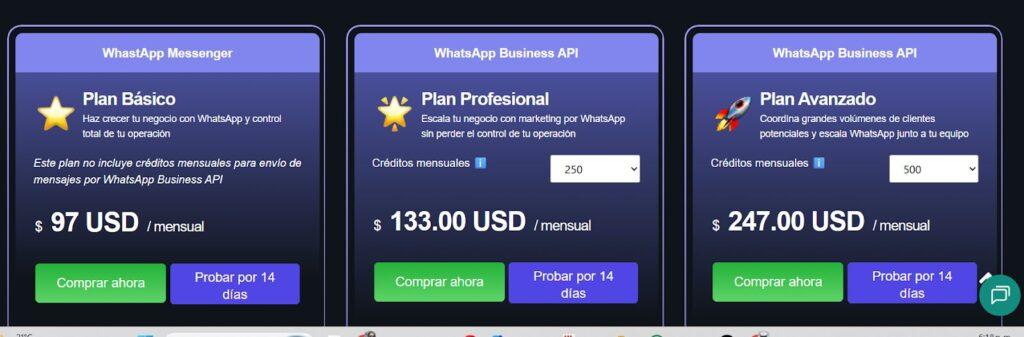
Leadsales offers separate plans for WhatsApp Messenger and the WhatsApp Business API, so you can choose based on your current needs:
- Basic Plan: $97/month – WhatsApp Messenger only (no monthly API credits).
- Professional Plan: $133/month – WhatsApp Business API with 250 monthly credits.
- Advanced Plan: $247/month – WhatsApp Business API with 500 monthly credits.
2. Salesforce
If your company already uses Salesforce, adding WhatsApp keeps things simpler. Your team can reply to clients without leaving the platform. Each chat stays linked to the customer record, so every interaction is easy to follow.
What you can do with Salesforce
- See the full story of each client → Every WhatsApp message is stored in the customer profile, so anyone in the team can pick up the conversation without missing details.
- Automate routine tasks → Set rules like “Create a follow-up” or “Assign to sales rep” whenever a WhatsApp message arrives.
- Get insights from conversations → Use built-in AI tools to spot new opportunities or track service quality.
Salesforce pricing
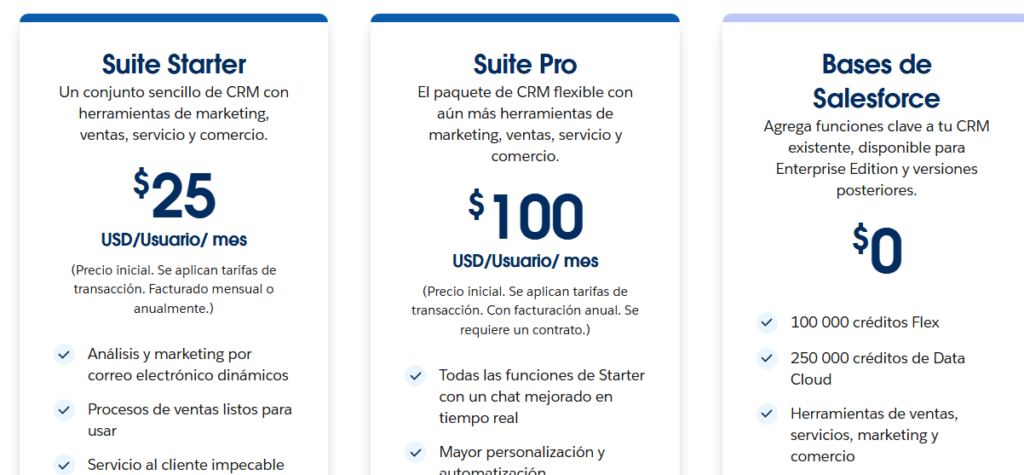
Salesforce offers different plans depending on how much flexibility and how many advanced features your business needs:
- Suite Starter: $25 USD per user/month.
- Suite Pro: $100 USD per user/month (annual billing required).
- Salesforce Base: $0 USD (available for Enterprise Edition and higher, includes credits and core functions).
3. Clientify
Clientify combines CRM functions with marketing automation so that sales and marketing teams can work together in one place. With its WhatsApp integration, you can follow up with leads quickly, send campaigns, and analyze results without switching tools.
What you can do with Clientify
- Send WhatsApp campaigns → Launch segmented messages directly from the platform to nurture contacts or announce offers.
- Track performance in real time → See how many leads respond and how campaigns are performing to adjust strategies quickly.
- Automate marketing tasks → Create workflows that send messages, assign leads, or update contact info based on client actions.
Clientify pricing
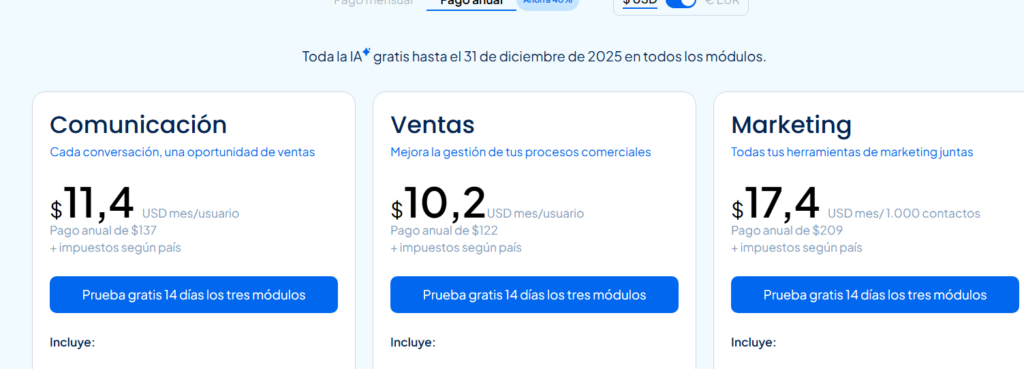
Clientify offers three flexible modules that can be combined based on your business needs. Each one includes a 14-day free trial:
- Communication: $19 USD per user/month.
- Sales: $17 USD per user/month.
- Marketing: $29 USD per 1,000 contacts/month.
4. Callbell
Callbell is built for teams that manage WhatsApp conversations together. No need to share a single phone; each agent answers from their own account, while chats stay organized in one inbox. This keeps teamwork clear and responses fast.
What you can do with Callbell
- Use a shared inbox → Centralize all WhatsApp, Messenger, and Instagram messages in one dashboard for better visibility and control.
- Assign chats automatically → New conversations are routed to available agents automatically, so no lead is left waiting.
- Collaborate in real time → Agents can add notes and tags inside conversations, making teamwork smoother.
Callbell pricing
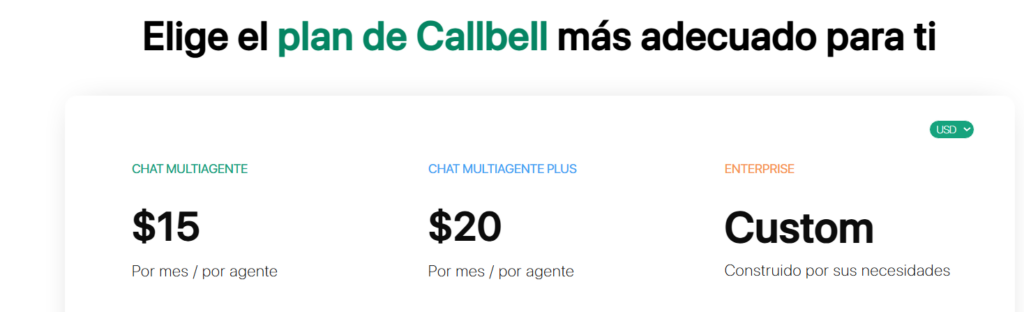
Callbell offers simple, per-agent pricing with a free trial included:
- Multi-Agent Chat: $15 USD per agent/month.
- Multi-Agent Chat Plus: $20 USD per agent/month.
- Enterprise: Custom plan built for specific business needs.
5. Zoho CRM
Zoho CRM is known for being flexible and easy to adapt. With its WhatsApp integration, you can manage conversations along with sales pipelines, marketing tasks, and customer data in one system.
What you can do with Zoho CRM
- Centralize conversations → Manage WhatsApp messages together with emails, calls, and other channels in one platform for a unified view of each client
- Automate daily work → Create workflows that send follow-ups, update contact records, or assign leads automatically.
- Customize dashboards → Build reports that show exactly what matters for your sales or support team.
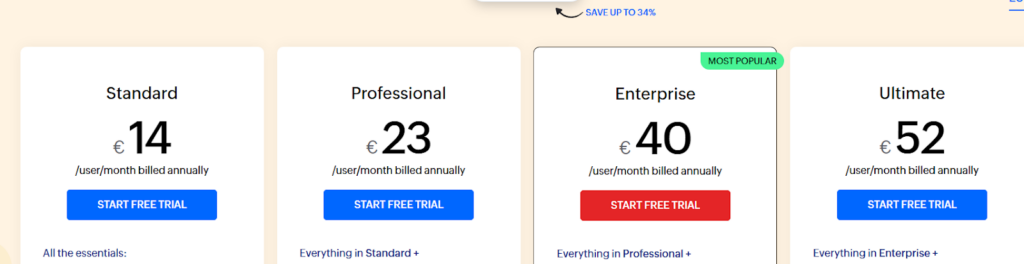
Zoho CRM pricing
Zoho offers different plans depending on how advanced you need the features to be. All come with a free trial:
- Standard: $15 USD per user/month.
- Professional: $25 USD per user/month.
- Enterprise: $43 USD per user/month.
- Ultimate: $56 USD per user/month.
6. Pipedrive
Pipedrive is designed for small businesses that want a clear and simple way to manage sales. With its WhatsApp integration, you can see conversations right next to your pipeline, automate follow-ups, and keep your team focused on closing deals instead of juggling apps.
What you can do with Pipedrive
- Visual sales pipeline → Drag and drop deals through stages while keeping WhatsApp chats linked to each lead for full context.
- Automate follow-ups → Set reminders or send automatic messages, so no prospect is forgotten.
- Use AI features → Get suggestions to improve your sales process and shorten the time to close deals.
Pipedrive pricing
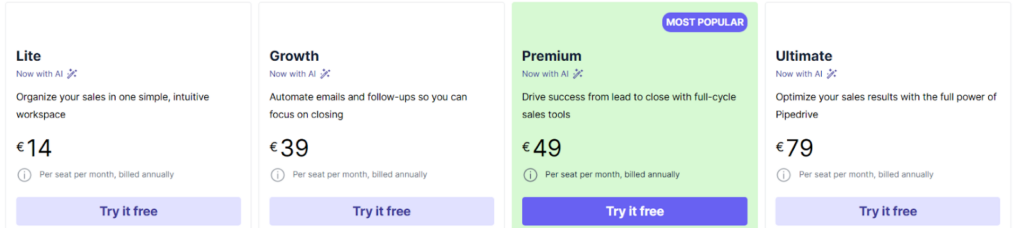
Pipedrive offers four plans, all billed annually and including a free trial:
- Lite: $15 USD per user/month.
- Growth: $42 USD per user/month.
- Premium: $52 USD per user/month.
- Ultimate: $85 USD per user/month.
7. Trengo
Trengo helps teams manage all customer conversations in one shared inbox. With WhatsApp, email, Instagram, and more in the same place, you can avoid switching platforms and keep your responses fast and consistent. It’s especially useful for businesses that use multiple channels every day.
What you can do with Trengo
- Unify your inbox → Collect WhatsApp, email, and social media messages in one dashboard.
- Automate basic tasks → Set automatic replies or routing rules, so no message is left unanswered.
- Collaborate as a team → Assign chats, add notes, and share context without leaving the conversation.
Trengo pricing
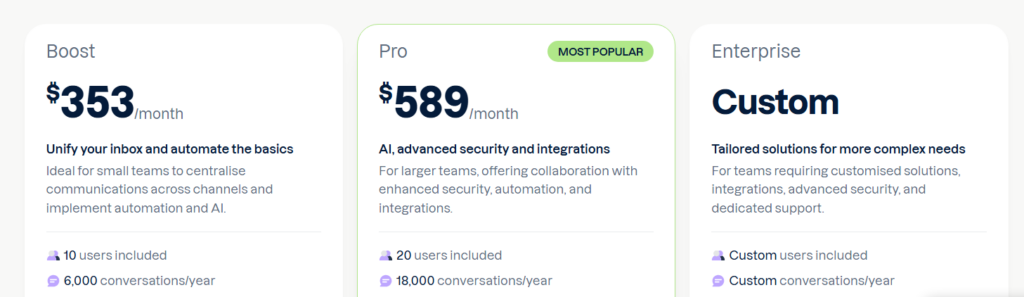
Trengo offers plans that include users and message limits per year, with a free trial to test before committing:
- Boost: $353 USD/month – 10 users included, 6,000 conversations/year.
- Pro: $589 USD/month – 20 users included, 18,000 conversations/year.
- Enterprise: Custom pricing – personalized users, conversations, and advanced support.
8. Timelines AI
TimelinesAI is built for sales & support teams that use WhatsApp heavily and want to eliminate communication silos. It offers a unified inbox across multiple WhatsApp numbers, native integrations with HubSpot, Pipedrive, Zoho CRM, Salesforce, and monday.com, and workflow automations — all without needing the WhatsApp Business API.
What you can do with TimelinesAI
- Manage multiple WhatsApp numbers in a single shared inbox → centralise team chats, assign with permissions, handle group chats and attachments.
- Automate at scale → connect WhatsApp conversations with CRM triggers (e.g., deal stage change), build visual workflows (drag-and-drop) to auto-respond or route chats.
- Connect with your existing tech stack → native CRM integrations + Zapier / webhooks for 1,000+ apps. Sync chats, contacts, deals automatically.
- Deploy AI helpers → integrate with ChatGPT to summarise long WhatsApp conversations or even auto-respond when your team is offline.
TimelinesAI pricing
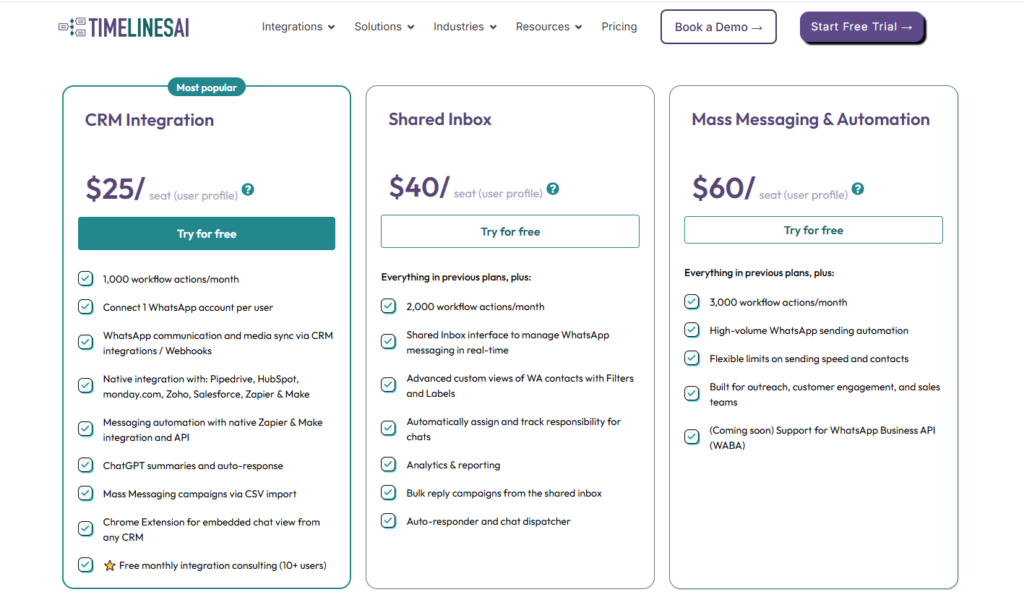
TimelinesAI offers
1. Free trial (10 days, no credit card required).
2. For full pricing, they list per-seat tiers such as: Automation - $10/seat/month
3. CRM Integration - $25/seat/month
4. Shared Inbox - $40/seat/month
5. Mass Messaging & Automation - $60/seat/month.
9. Respond.io
Respond.io is designed for companies that handle a high volume of daily conversations across multiple channels. With WhatsApp integration, you can centralize chats, automate replies, and use advanced reporting to keep track of performance. It’s a strong option if your team manages marketing, sales, and support in the same tool.
What you can do with Respond.io
- Manage all channels in one place → Combine WhatsApp, email, and other apps in a shared inbox.
- Automate at scale → Set up chatbots and workflows to reply instantly and route messages to the right department or agent.
- Track campaign results → Monitor engagement from WhatsApp campaigns and analyze which actions lead to higher conversions.
Respond.io pricing
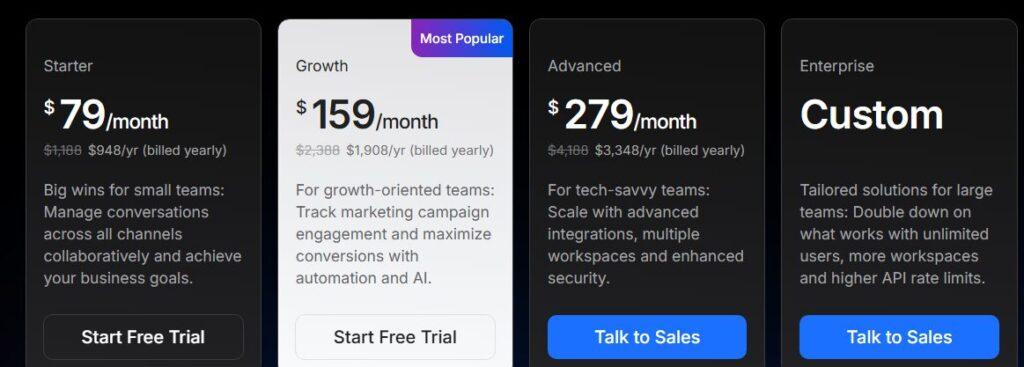
Respond.io offers flexible plans depending on your team’s size and messaging needs. All include a free trial:
- Starter: $79 USD/month.
- Growth: $159 USD/month.
- Advanced: $279 USD/month.
- Enterprise: Custom pricing, with unlimited users and higher API limits.
10. Whaticket
Whaticket helps businesses centralize conversations from WhatsApp, Facebook, Instagram, and webchat in a single inbox. Teams can save time, respond faster, and stay focused on important tasks without constantly switching between platforms.
What you can do with Whaticket
- Manage multiple channels → Bring together WhatsApp, Messenger, Instagram, and webchat in one dashboard to simplify your team’s workflow.
- Automate replies → Set up quick responses and basic workflows to answer frequent questions correctly.
- Collaborate with your team → Add multiple users, so each agent manages their own chats without conflicts.
Whaticket pricing
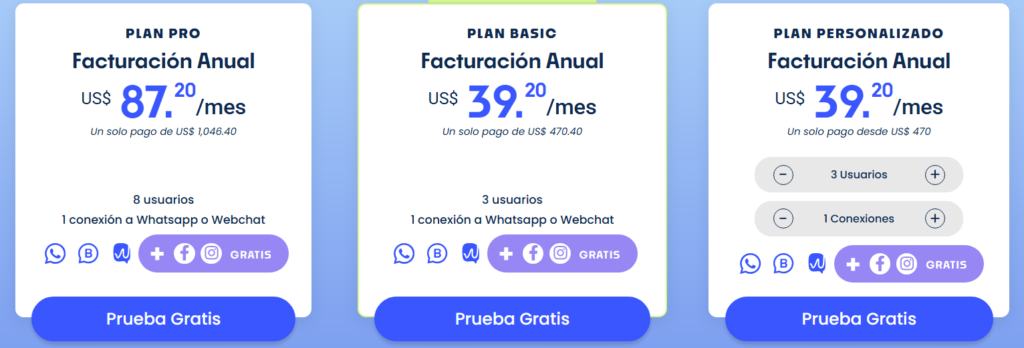
Whaticket offers simple plans with annual billing and a free trial to test the platform:
- Basic Plan: $39.20 USD/month – includes 3 users and 1 WhatsApp or webchat connection.
- Pro Plan: $87.20 USD/month – includes 8 users and 1 WhatsApp or webchat connection.
- Custom Plan: from $39.20 USD/month – personalized setup with adjustable users and connections.
How to choose the best CRM for WhatsApp
Every day, more than 175 million people send messages to businesses on WhatsApp, according to Verloop. That volume makes it clear why choosing a CRM that connects with all your channels is so important. Before deciding, take a look at these points:
1. Team size
- Small teams need something quick and simple.
- Big teams may need automation, reports, and customization.
2. Ease of use
- Some CRMs offer intuitive interfaces that work out of the box.
- Others probably recommend onboarding or training sessions, especially if they offer more customization.
3. Integrations
- Make sure the CRM integrates with your existing tools, such as billing software, support platforms, or marketing automation systems.
- A well-integrated WhatsApp CRM offers consistent communication across all your channels.
Make WhatsApp sales easier every day with Leadsales
Many businesses already use WhatsApp as their main sales channel, but managing chats without a system often means missed follow-ups and lost deals. A WhatsApp CRM gives you control over those conversations and helps teams respond on time.
Leadsales was built with this in mind: it keeps all chats in one place, allows you to assign them fairly across your team, and moves each lead through simple visual funnels. No extra apps, no complicated setups, just a tool that makes WhatsApp sales easier every day.
💡Start selling more with Leadsales, just like thousands of companies already have.
Frequently Asked Questions (FAQ) on the best WhatsApp CRM
What is the best CRM to integrate with WhatsApp?
For many small and medium businesses in Mexico and across LATAM, the best choice is Leadsales. It was created specifically to sell on WhatsApp, so you can centralize all chats, assign them to your team, and move every lead through easy-to-use sales funnels. This makes daily follow-ups faster and much more organized.
Why use a CRM instead of WhatsApp alone?
Because with many daily chats, it's easy to lose track of leads or miss follow-ups. A CRM keeps everything in one place, helps you reply faster, and gives visibility on who is handling each client.
Do WhatsApp CRMs work only for big companies?
No. There are solutions for businesses of all sizes. Some CRMs are simple and fast to set up for small teams, while others are designed for enterprises that need advanced features like automation, integrations, and multi-user support.